A job shop owner I worked with had Epicor on the shortlist for one reason: the demo showed a configurator that turned a customer’s drawing into a routed job in about ninety seconds. That’s a real strength. What the demo didn’t show was the months of bill-of-material cleanup required before the configurator could do that with his parts. That gap between demo and production is the whole story of evaluating Epicor ERP.
This isn’t a small vendor, and the product isn’t bad. It’s a company that grew through acquisitions, which means the name on the proposal can point to three different systems with different strengths. Buyers who treat “Epicor” as one product end up comparing the wrong references and scoping the wrong implementation.
Epicor ERP Is Really Three Products
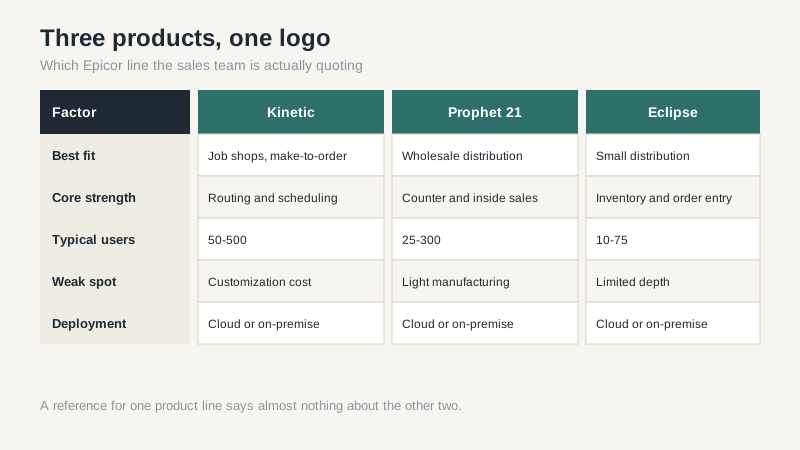
Epicor sells three main ERP lines in the U.S. market, and they came from different acquisitions. Kinetic is the manufacturing product, the descendant of Epicor ERP 10, and it’s the one most job shops and make-to-order manufacturers see. Prophet 21 is the distribution product, strong in wholesale and fastener and hardware distribution. Eclipse is the smaller distribution line, often used by companies that need inventory and counter sales without a full manufacturing model.
There’s also Epicor iScala for international mid-market operations, but you’ll rarely see it in a U.S. shortlist unless the company has European subsidiaries. The important point is that a Kinetic reference tells you nothing about Prophet 21, and a Prophet 21 implementation team may not be the right team for a manufacturer. Vendors tend to present Epicor ERP as one platform. It isn’t.
What the Demo Doesn’t Show
Kinetic’s interface is configurable, and the underlying BAQ tool, Business Activity Query, is genuinely useful for pulling data without a developer. The cost is that every customization, dashboard, and layer of personalization has to be tested at upgrade time. Epicor has moved customers toward its cloud offering, and the upgrade cadence is faster than the old on-premise world. Companies that spent a decade customizing the on-prem system often find that the cloud move is really a reimplementation with a migration attached.
Ask about the version you’re buying and the upgrade path. Ask how many of your proposed customizations are actually configuration. Ask whether the partner will support the system after go-live or hand you to Epicor support. The answers separate a smooth project from a two-year slog.
One more demo trap: the scheduling engine. Epicor can show a finite-capacity schedule that looks like a solved problem. In practice, the schedule is only as good as the routings, work center calendars, and operation times in your data. If your current system tracks labor at the job level rather than the operation level, you’ll spend the first phase building data that the scheduling engine needs. That’s not a software flaw, but it is a budget line the sales cycle tends to skip.
Licensing and Implementation Costs
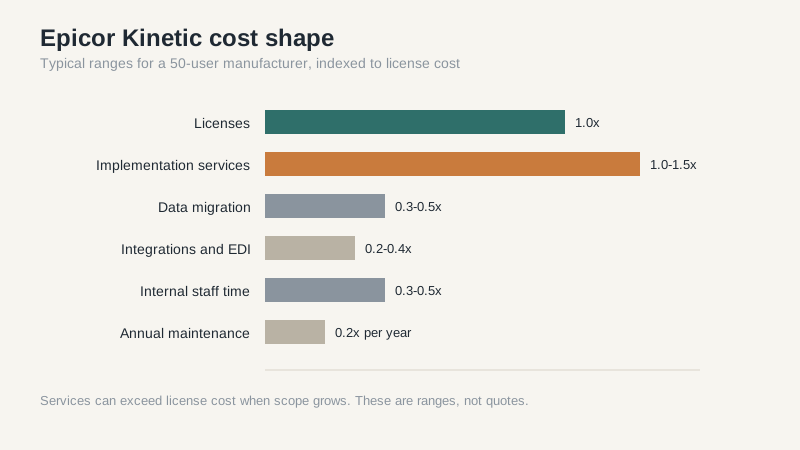
Epicor doesn’t publish a clean price list, which is itself a warning. In most mid-market deals I’ve seen, Kinetic licensing lands somewhere between $1,500 and $3,000 per named user for a perpetual license, with annual maintenance around 20% of that. Cloud subscription pricing is often quoted per user per month and varies with modules. Prophet 21 pricing follows a similar shape but with different module bundles.
Implementation is the bigger number. A 50-user manufacturer with modest customization should budget roughly the license cost again in services, and more if data is messy or the company wants to change processes during the project. I’ve seen services exceed license cost by two or three times when the scope crept. The line items that blow up are data migration, custom reports, EDI connections, and anything involving a legacy system nobody documented.
The cloud versus on-premise question deserves its own conversation. Epicor’s cloud offering removes server maintenance and shifts upgrades to the vendor’s schedule, but it also reduces your control over timing. A manufacturer with a busy fourth quarter may not want an upgrade in November, and cloud contracts rarely let you choose. If seasonal stability matters, ask for the release calendar and the rollback policy in writing.
Where Epicor Wins and Where It Loses
Epicor wins when the manufacturing process is the hard part. Job shops, make-to-order, mixed-mode, and companies with deep routing and scheduling needs often find Kinetic closer to their reality than a general-purpose ERP. The configurator, estimating, and shop-floor data collection are mature. Prophet 21 wins in distribution when the counter and inside sales workflow matters as much as the warehouse.
It loses when the buyer wants a simple system for finance and order entry, when the company can’t commit a full-time project manager, or when the partner relationship is weak. Epicor’s partner network is smaller than Microsoft’s, and in some U.S. metros you may have one credible option. That’s a risk. If the partner goes sideways, switching is expensive.
Compare carefully with NetSuite if you’re distribution-heavy and want a single cloud system, and with Sage if you’re smaller and cost-sensitive. Neither will match Kinetic’s manufacturing depth, but both may be easier to run.
The Questions I’d Ask Before Signing
Ask for a reference running the same product line, the same modules, and a similar process mix. Ask what percentage of their users actually log in daily, because shelfware licenses are common. Ask for a fixed-scope discovery phase before the big contract, paid but capped. Ask who owns the data model and how you get your data out if you leave. Ask what the annual uplift is on cloud subscriptions and what happens if you miss a payment.
Also ask who will be on your implementation team by name, and whether those people are employees or contractors. Epicor partners vary a lot in depth, and the A-team you met during the sales cycle is not always the team that shows up at kickoff. That single question has saved more than one buyer from a painful surprise.
My blunt judgment: Epicor ERP is a strong fit for complex manufacturing and a mediocre fit for simple businesses that got sold on the demo. If your process is genuinely complicated, Kinetic earns its keep. If it isn’t, you’ll spend years paying for capability you don’t use.
