Most buyers who put Microsoft ERP on a shortlist don’t realize they’ve actually shortlisted four or five different products. The name on the RFP says Microsoft, but the sales team can quote you Business Central, Dynamics 365 Finance, Dynamics 365 Supply Chain Management, or an older Dynamics GP or AX system that’s still running in plenty of U.S. plants. Those are not trim levels of the same vehicle. They have different data models, different licensing, and different partners who support them.
I’ve watched mid-market manufacturers sign for Business Central expecting Microsoft ERP, then discover that the multi-entity consolidation and advanced warehouse work they described in the demo lives in Finance and Supply Chain Management, at roughly double the subscription. The reverse happens too. A $200 million distributor buys Finance because it sounds more serious, then spends a year fighting a product that assumes a finance department with dedicated analysts.
What Microsoft ERP Actually Covers
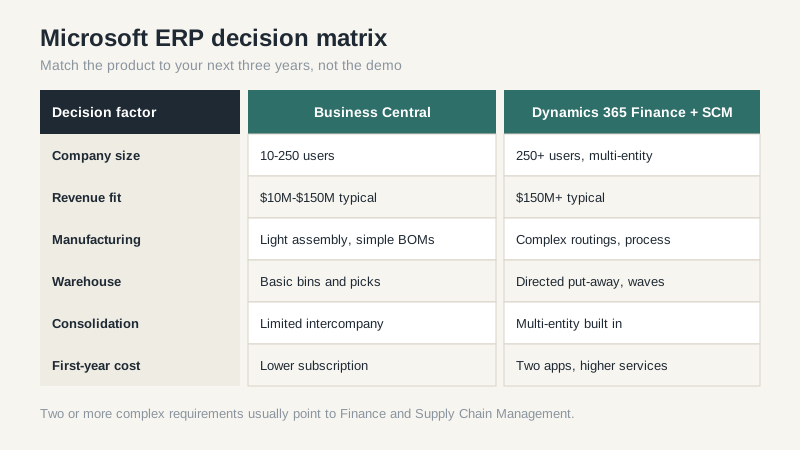
Business Central is the successor to Dynamics NAV, aimed at companies from about 10 to 250 users. It handles finance, sales, purchasing, inventory, light manufacturing, and projects. For a U.S. distributor doing $20 million to $150 million, it covers most of the daily work without much customization. The catch is that “light manufacturing” means light. If you run complex routings, co-products, or process manufacturing with batch traceability, you’ll feel the ceiling quickly.
Dynamics 365 Finance and Dynamics 365 Supply Chain Management are the successors to AX. They’re separate apps that share a common data platform, and Microsoft prices them separately. Finance covers general ledger, accounts payable and receivable, budgeting, and fixed assets. Supply Chain Management covers procurement, warehousing, transportation, and production control. A manufacturer that needs both is buying two subscriptions per user, which is where budgets start to bend.
Licensing Math That Surprises Finance Teams
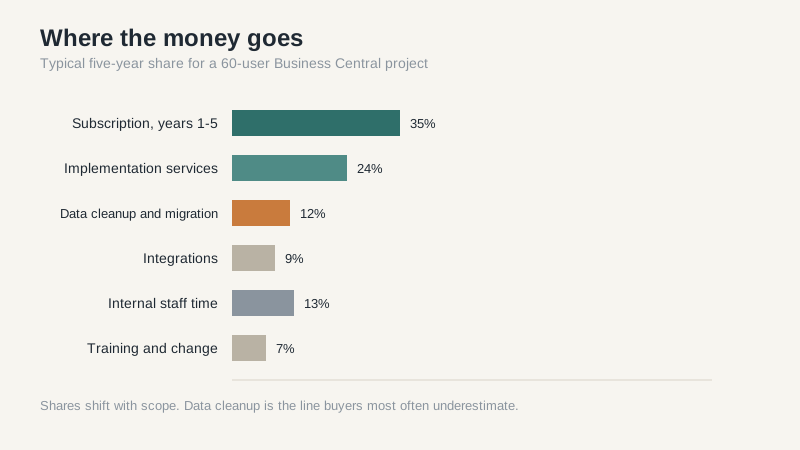
Microsoft’s published list prices are only the start. Business Central Essentials and Premium tiers differ mainly by manufacturing and service management, and the Premium tier is usually the right call for anyone making physical goods. On top of that you need a partner to implement, and the partner’s rate is not set by Microsoft. In most U.S. projects I’ve seen, implementation services run somewhere between 0.75 and 1.5 times the first-year subscription, depending on how much of the business you try to model at once.
Then there’s the database. Business Central online includes a storage allowance, and companies that keep ten years of transaction history plus attachments tend to exceed it. Extra storage is not catastrophic, but it’s a line item nobody puts in the board deck. The same is true for sandbox environments, which are cheap until you need a second one for testing an upgrade.
Dynamics 365 Finance and Supply Chain Management licensing is more complicated. Microsoft sells named user licenses by role, plus capacity add-ons for things like order lines and warehouse transactions. A company that models every shop-floor employee as a full user will pay far more than one that uses device or team member licenses. Ask the partner to show the license model against your actual headcount by role, not a generic 50-user assumption.
Business Central vs. Dynamics 365 Finance: The Real Split
The decision usually comes down to four questions. Do you need multi-company consolidation across legal entities with different charts of accounts? Do you run manufacturing with more than a few routings and a real bill of materials explosion? Do you need warehouse management with directed put-away and wave picking? Do you have a finance team that can support a system built for larger organizations?
Two yeses point to Finance and Supply Chain. Zero or one points to Business Central, and you should fight the urge to buy headroom you won’t use for five years. Software that’s too big is its own failure mode: users work around it, the partner bills change requests, and the go-live slips.
There’s a middle path worth asking about. Some companies run Business Central for subsidiaries and consolidate into Finance at the parent. That works, but it adds integration work and a second set of master data rules. Budget for it honestly.
Implementation Traps I See Repeatedly
The first trap is treating the Microsoft demo as the product. Microsoft’s demo data is clean, the workflows are simple, and every screen has been tuned. Your item master has duplicate part numbers, units of measure that don’t convert cleanly, and customers with six ship-to addresses. Data cleanup is usually 20-30% of the project budget, and it’s the part everyone tries to compress.
Partner fit is the second trap. A partner with deep Business Central experience may have never implemented Supply Chain Management, and vice versa. Ask for references in your industry and your size band, then call them without the partner on the line. If the partner can’t name a customer who runs the same modules you’re buying, keep looking.
Customization is the third trap. Business Central extensions are cleaner than the old NAV modifications, but every extension still has to be maintained through upgrades. I’ve seen companies accumulate forty extensions and then pay more to test an upgrade than the original customization cost. Push configuration first, and make the partner explain the long-term maintenance cost of every code change.
A Sensible Shortlist Process
Start with your process map, not the product brochure. Write down the ten transactions that cause the most pain today, then ask each vendor to show those ten in their system using your data. For Microsoft, that means asking specifically which product will be demonstrated. A Business Central demo does not tell you how Finance handles intercompany eliminations, and a Finance demo does not tell you whether Business Central can run your shop floor.
Get the five-year cost in writing: subscription, implementation, data migration, integration, training, and the internal project manager you’ll inevitably assign. Compare that number across vendors instead of comparing monthly per-user rates. The monthly rate is marketing. The five-year number is the decision. If you want a broader view of how the categories compare, our ERP software guide walks through the tradeoffs; for the Microsoft-specific product line, see the Dynamics 365 ERP breakdown.
My blunt take: Business Central is the right Microsoft ERP for most U.S. mid-market companies, and Finance is right for a smaller number than the sales math suggests. Buy the product that fits your next three years, not the one that fits a Fortune 500 org chart you’ll never have.
