The cloud ERP pitch is easy to like: lower upfront cash, automatic upgrades, and a finance team that can close the books from a hotel room. Then the five-year model lands on the CFO’s desk, and the subscription line is larger than the on-premises license everyone thought they were avoiding.
That doesn’t make cloud the wrong choice. It makes the comparison lazy. The useful question is which costs move from the capital budget to the operating budget, which ones genuinely disappear, and which ones get bigger after go-live.
The cloud ERP benefits that survive a budget review
Cash timing is the clearest benefit. A $60,000 annual subscription hurts less in year one than a $180,000 server, storage, and license purchase. For a company that needs to preserve a credit line or fund a plant expansion, that difference can decide the project. It’s a financing advantage as much as a technology one.
Upgrade responsibility shifts to the vendor. On-premises teams spend real hours applying patches, testing them, and fixing what breaks. Cloud vendors take that work on, though they also decide when changes arrive. Your team still has to test the workflows that matter, which is a smaller job than patching servers but not zero.
Access and recovery are easier to defend. A cloud ERP system with a reputable host gives you browser access from a second site and a tested recovery plan you didn’t have to build. For a distributor with one warehouse and a thin IT staff, that’s worth something concrete. Price it against the cost of a redundant server room and a generator you’ll test twice a year.
Where the subscription math turns
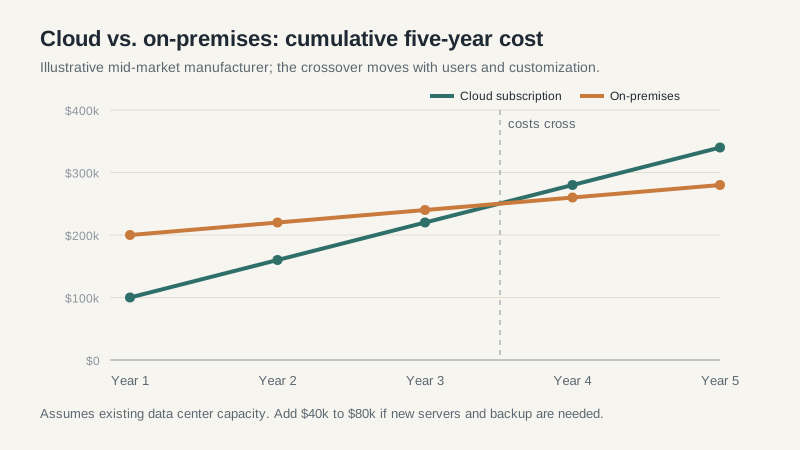
Cloud subscriptions usually cost less in year one and more by year five. The crossover depends on user count, module mix, and how much you customize. In a typical 100-user manufacturing comparison I’d model, on-premises wins on total cash around years four to six, assuming you already have a data center and staff to run it.
That assumption is doing a lot of work. If you’d need to hire an infrastructure admin or build a server room, the cloud case improves fast. If you already run a VMware cluster and a network team, the on-premises case is stronger than the vendor slide admits.
Per-user pricing has a second trap: occasional users. Warehouse staff who scan a few transactions a day, executives who approve expenses, and customers who check order status all need access. Vendors solve this with cheaper “lite” licenses, partner portals, or integrations that cost money to build. Map every user by frequency before you accept a per-seat quote.
Renewal increases are the quiet line item. Contracts often allow 5% to 8% annual uplifts, and module prices can change when you add capability later. Ask for a five-year schedule with the uplift written in, then compare that number to the on-premises maintenance rate, which is usually 18% to 22% of license value.
What cloud ERP migration actually costs
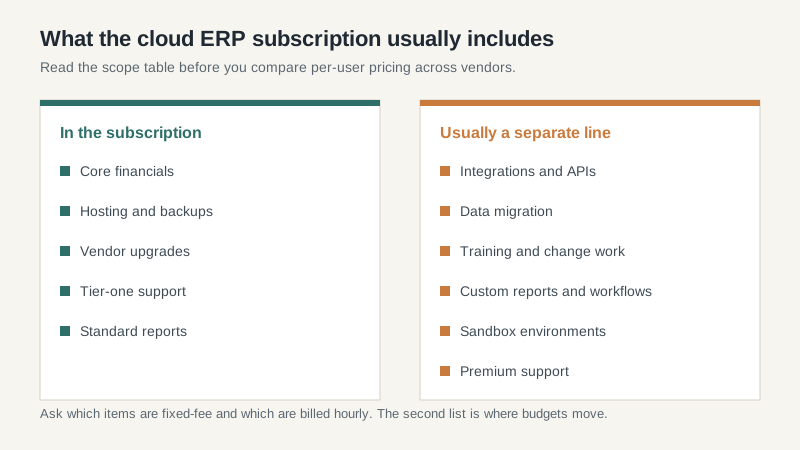
Migration is where the business case usually breaks. Moving from an old ERP to a cloud system means cleaning item masters, customer records, open orders, and history. The vendor’s implementation estimate often assumes you’ll do that work. Most mid-market companies underestimate it by half.
Integrations are the next surprise. A cloud ERP system rarely runs alone. You’ll connect a warehouse management system, an EDI translator, a CRM, a payroll provider, and maybe a bank feed. Each connection needs an owner, a test plan, and someone to fix it when an API changes. Budget $15,000 to $60,000 per meaningful integration, depending on complexity.
Customization is the third cost, and it behaves differently in the cloud. On-premises custom code can sit untouched for years. Cloud customizations have to survive quarterly releases. A report that took two weeks to build may need rework twice a year. That’s not a reason to avoid the cloud, but it is a reason to keep custom code to a minimum and document it.
The operating changes nobody budgets for
Someone has to own the system after go-live. In a cloud model that person is usually a business analyst or IT generalist who manages users, coordinates vendor tickets, tests releases, and keeps integrations healthy. That’s a real role, not a side duty for the controller. Companies that skip it end up with a system that slowly drifts away from how the business actually works.
Training is another line that gets cut first. A cloud interface looks familiar, so leaders assume adoption will be easy. It won’t be. Warehouse staff need practice with scanners and exceptions. Finance needs to understand new close procedures. Sales needs to trust the order status screen. Budget time for floor support during the first two closes, not a single webinar before launch.
Then there’s the exit plan. Cloud contracts should tell you how to get your data out, in what format, and at what cost. If the answer is vague, assume the worst. The point isn’t that you’ll leave. It’s that the option to leave keeps renewal pricing honest.
When cloud ERP still loses to on-premises
Cloud isn’t automatically the modern choice. A manufacturer with a plant in a rural area and unreliable broadband may get better response time from a local server. A company with a large, well-run data center and a strong infrastructure team may find the five-year math favors keeping the system in-house. A business with highly specialized shop-floor integrations may decide the cloud upgrade treadmill costs more than the hardware it replaces.
Those cases are narrower than they were a decade ago, and they require honest numbers rather than nostalgia. Run both models with the same scope, the same user count, and the same integration list. If on-premises still wins, keep it. If cloud wins, go in with your eyes open about the renewal schedule.
A five-year test I’d run before signing
Take the vendor’s proposal and add four lines the sales deck usually leaves out: internal staff time during implementation, integration work, release testing after go-live, and the renewal uplifts. Then compare that total to a realistic on-premises model that includes hardware refresh, maintenance, and the staff you’d need to run it.
If the cloud number is within 10% to 15% of the on-premises number, choose cloud for the flexibility and move on. If it’s dramatically cheaper, check what was excluded. And if the vendor won’t give you a five-year schedule before you sign, treat that as your answer. The ERP software buying guide walks through the rest of the evaluation, including the contract terms that decide how painful a later exit will be.
