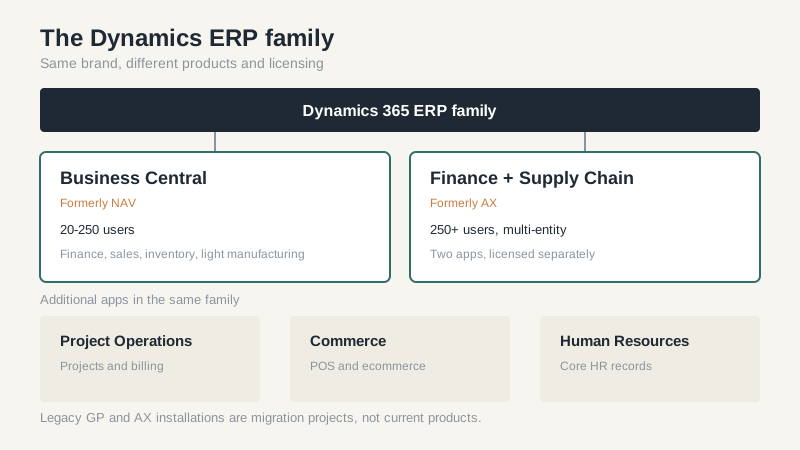
“Dynamics” is a family name, not a product. That single fact explains most of the confusion in the first meeting. A company says it’s evaluating Dynamics ERP, and the partner has to figure out whether they mean Business Central, Finance, Supply Chain Management, Project Operations, or the older Dynamics GP system they’ve been running since 2012. The answers to “what does it cost” and “how long does it take” are completely different depending on which one you mean.
I’ve seen buyers compare a Business Central quote with a Finance quote and conclude that Microsoft is inconsistent. It isn’t. They’re looking at two products built for different organizations, sold through different partner practices, with different assumptions about how much process discipline the customer already has.
The Dynamics ERP Family, Decoded
Business Central is the mid-market product, formerly NAV. It covers finance, sales, purchasing, inventory, projects, and light manufacturing. It’s sold through partners, runs in the Microsoft cloud or on-premise, and has a large add-on ecosystem. For a U.S. company with 20 to 250 users, it’s the default Dynamics answer.
Finance and Supply Chain Management are the enterprise apps, formerly AX. They share a data platform and a security model but are licensed separately. Finance handles accounting, budgeting, and fixed assets. Supply Chain Management handles procurement, production, warehousing, and transportation. Companies that need both buy both, which is why the license line can look alarming next to a Business Central quote.
Project Operations covers professional services and project-based work. Commerce covers point of sale and ecommerce operations. Human Resources covers core HR. Most mid-market buyers won’t need all of these, but the module names show up in proposals and inflate scope.
Licensing Models and Hidden Costs
Microsoft publishes list prices, and partners discount them. That’s the simple part. The complicated part is the license model. Business Central has Essentials and Premium tiers, and Premium is usually required for manufacturing. Dynamics 365 Finance and Supply Chain Management use named user licenses by role, plus capacity add-ons. A company that licenses every shop-floor worker as a full user will pay far more than one that uses device or team member licenses where they fit.
Implementation services are the second number, and they vary widely. A 40-user Business Central project with clean data might run $60,000 to $120,000 in services in the U.S. market. The same headcount on Finance and Supply Chain Management can run two to four times that, because the product assumes more configuration and more process discipline. These are ranges, not quotes; the scope decides.
Don’t forget the internal cost. A Dynamics ERP project needs a project manager at half time for nine months, department leads in workshops, and users doing testing. Those are real costs even if they don’t appear on an invoice. Companies that ignore this number consistently underestimate the project by 15-25%.
Migration from GP, NAV, or AX
The migration path matters more than the sales rep admits. Dynamics GP is out of mainstream support, and Microsoft has been steering customers toward Business Central for years. A GP to Business Central migration sounds straightforward until you inventory the customizations, the third-party add-ons, and the reports built in SmartList or SQL. Most of that doesn’t move automatically. Budget time for rebuilding reports and deciding which customizations are still needed.
NAV to Business Central is easier because the data model is related, but customizations built in C/AL need to be rewritten as extensions. AX to Finance and Supply Chain Management is a bigger jump: different data model, different reporting, different user experience. I’ve seen AX migrations take eighteen months for companies that expected nine, mostly because they tried to carry every historical customization forward.
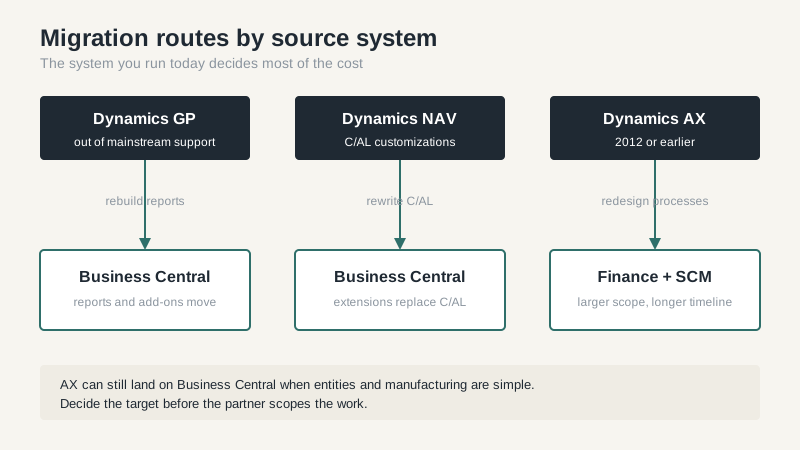
The best migration advice I can give is to treat the move as a chance to retire processes instead of porting them unchanged. Every customization you carry forward is a permanent maintenance cost. Every report nobody reads is a report you don’t need to rebuild. Do that pruning before the partner scopes the work, because scope negotiated after the contract is expensive.
Partner Selection Matters More Than the Product
Microsoft sells through partners, and the partner does the implementation, the training, and often the support. Two partners quoting the same product can produce wildly different outcomes. Ask how many implementations of this exact product they’ve done in the last two years, how many in your industry, and how many of their consultants are certified. Ask for the names of two customers who went live in the last eighteen months and call them.
Watch for partners who sell all four major ERP brands. They may be competent, but their incentive is to close a deal, not to steer you to the best fit. A partner with a focused practice will sometimes tell you that their product is wrong for you. That’s a good sign.
Also ask who owns the relationship after go-live. Some partners hand you to a support desk and disappear. Others stay involved and help you plan the next phase. The difference shows up in year two, when the original project manager has moved on and you need someone who remembers why a customization exists.
What I’d Do First
Write a one-page process map and a one-page data reality check before you take another demo. The process map lists the ten transactions that matter most and who performs them. The data reality check lists your item count, customer count, open orders, and the systems those records live in today. Send both to every partner and ask for a scoped response. The proposals will be more comparable, and the partners who can’t answer clearly will eliminate themselves.
If you’re still narrowing the field, our ERP software guide covers the broader selection process, and the Microsoft ERP options article goes deeper on Business Central versus the enterprise apps.
Dynamics ERP is a solid choice for companies already committed to the Microsoft stack, especially those that value the Office integration and the partner ecosystem. It’s a poor choice if you want a single vendor to own everything and you don’t have the internal capacity to manage a partner relationship. Pick the product after you pick the partner, not before.
