The first Microsoft Dynamics 365 ERP proposal I reviewed for a distribution client had eleven line items, and four of them were for products nobody had asked about. That’s not unusual. Microsoft sells a platform, and the platform is modular by design. The sales motion encourages breadth, but most mid-market companies need a narrow slice: finance, order management, inventory, and maybe light manufacturing. Paying for the rest is optional, even when the proposal implies otherwise.
A bigger issue is that Microsoft Dynamics 365 ERP means different things to different people. Microsoft has renamed and reorganized these products several times, and the licensing has changed with each reorganization. Buyers who evaluated the product three years ago may be looking at a different commercial model today.
What Microsoft Dynamics 365 ERP Means Today
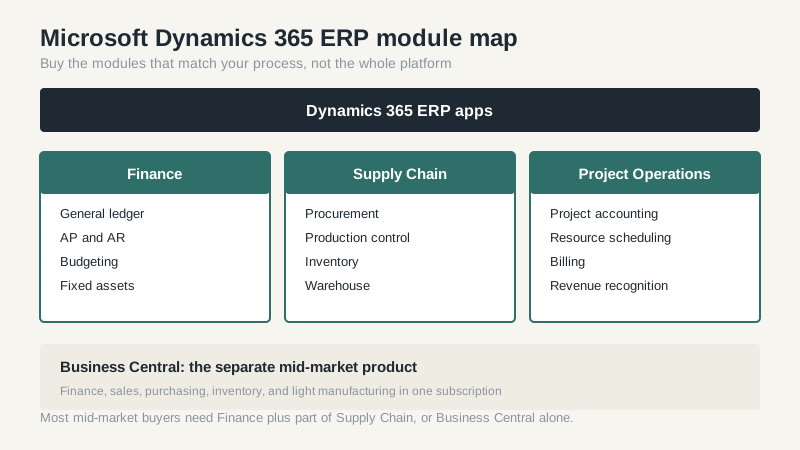
The current lineup puts the ERP products under the Dynamics 365 umbrella: Finance, Supply Chain Management, Project Operations, and Business Central, which is sold separately but shares the same family branding. Finance covers the general ledger, accounts payable and receivable, budgeting, fixed assets, and financial reporting. Supply Chain Management covers procurement, production, inventory, warehouse, and transportation. Project Operations handles project accounting and resource scheduling for services firms.
Business Central is the mid-market option and the one most U.S. companies under 250 users should look at first. It’s cheaper, faster to implement, and covers standard finance and distribution work well. Finance and Supply Chain Management are for companies with more entities, more users, or more complex processes than Business Central can handle without heavy customization.
The Module Map and What You Actually Need
Microsoft’s module list is long, and the pricing is tied to it. A typical mid-market manufacturer needs Finance, Supply Chain Management, and possibly Project Operations if they do engineer-to-order work. A distributor may need only Finance plus inventory and order management, which can be licensed through Supply Chain Management or handled in Business Central at a lower cost.
The trap is buying modules for capabilities you plan to use later. Later rarely arrives. Companies pay for warehouse management, transportation, or advanced production for years while running the same processes they had before. I’d rather see a company start narrow and add a module when a specific, funded project needs it.
There’s also a naming problem inside the sales process. “Supply Chain Management” covers a lot of ground, from procurement to warehouse to transportation, and two partners can quote the same label with different assumptions about which capabilities are included. Ask for the module list in writing, with the specific features you expect, and make the partner confirm that list in the statement of work.
Licensing: Named Users, Capacity, and Add-Ons
Microsoft Dynamics 365 ERP licensing is role-based. Microsoft publishes a set of named user licenses, and the price depends on what the user needs to do. Full users cost more; team member and device licenses cost less but restrict what the person can access. The capacity add-ons matter for companies with high transaction volume: order lines, warehouse transactions, and production orders all draw against capacity in some configurations.
Ask the partner to build a license model by role, not by headcount. List every person who will touch the system, what they’ll do, and how often. Then map that to license types. In most projects I’ve seen, a careful role mapping saves 10-20% against a flat full-user assumption. It’s tedious work, and it’s the difference between a license bill you can defend and one you can’t.
Watch the renewal terms as closely as the first-year price. Microsoft’s enterprise agreements and partner agreements can include annual uplifts, and the discount you get at signing is not guaranteed forever. Ask what the increase cap is, when it resets, and what happens if you reduce user counts. A license model that only works at full headcount is a model that will hurt during a slow year.
Implementation Reality and Partner Economics
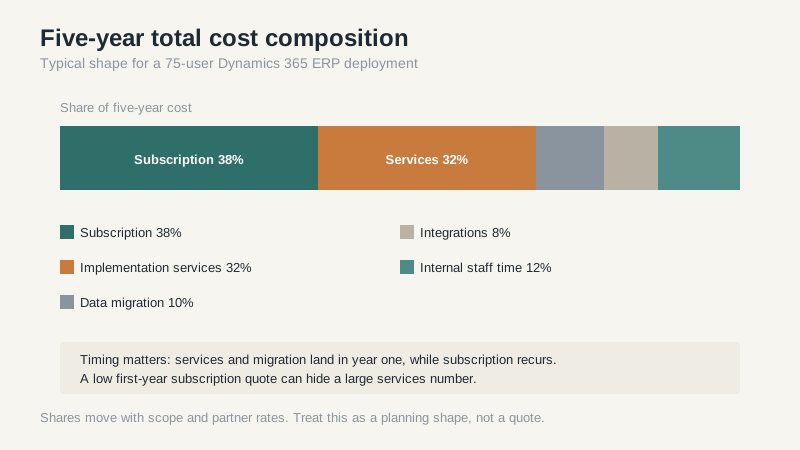
Implementation is where the budget goes. Microsoft partners bill by the hour or by the project, and the good ones are booked months out. A 75-user Finance and Supply Chain Management deployment in the U.S. commonly runs $250,000 to $600,000 in services, depending on scope, integrations, and how much of the business is changing. A Business Central project at the same headcount is usually a fraction of that.
Data migration deserves its own budget line. Customer records, item masters, open orders, and historical transactions rarely arrive clean. In most projects I’ve seen, the migration and reconciliation work runs 15-25% of the total services cost, and it’s the first thing squeezed when the schedule slips. Squeezing it is how you get a go-live that everyone celebrates and a month-end close that takes twice as long.
Then there’s the internal team. A project manager, a finance lead, an operations lead, and a group of subject-matter experts will spend real time on this. If you can’t free those people, the partner will fill the gap at an hourly rate, and the project will cost more in both money and goodwill.
One pattern I’d flag: companies often underestimate the integration work between Dynamics 365 ERP and the rest of their stack. If you run a separate CRM, a warehouse execution system, or an EDI provider, each connection needs an owner, a test plan, and a failure mode. Integration work is rarely the headline in a proposal, and it’s frequently the reason a go-live slips by a quarter.
Where It Makes Sense and Where It Doesn’t
Microsoft Dynamics 365 ERP makes sense for companies that already run Microsoft 365, want tight Office integration, need multi-entity consolidation, and have the internal capacity to manage a partner. It’s also a reasonable fit for companies that expect to grow through acquisition and want a platform that can absorb new entities.
It makes less sense for small companies that need standard accounting and order entry, for manufacturers with highly specialized processes that would require deep customization, and for buyers who want a single vendor to own everything when something breaks. Microsoft’s partner model spreads responsibility, and that can be frustrating when an integration fails at month-end.
If you’re comparing enterprise options, our Oracle ERP overview covers the other side of that decision, and the Dynamics ERP guide explains how the products relate. My advice is to price the five-year total, name the internal owner, and make the partner prove they’ve done this exact combination before you sign anything.
Buy the smallest product that can run your business for the next three years. If that’s Business Central, take the savings and spend some of it on data cleanup. If it’s Finance and Supply Chain Management, go in with your eyes open about the services number. Either way, the license quote is the beginning of the conversation, not the answer.
