Sage ERP is what buyers call when QuickBooks has run out of room but a tier-one project feels absurd. That’s a reasonable instinct, and it’s also where the confusion starts, because Sage sells at least four ERP products that share a logo and almost nothing else.
I’ve seen a distributor buy Sage 100 expecting a cloud roadmap and a manufacturer buy Sage Intacct expecting shop-floor control. Both were disappointed, and neither had asked the right question early enough: which Sage product is this, and who supports it in my region?
The Sage ERP product map
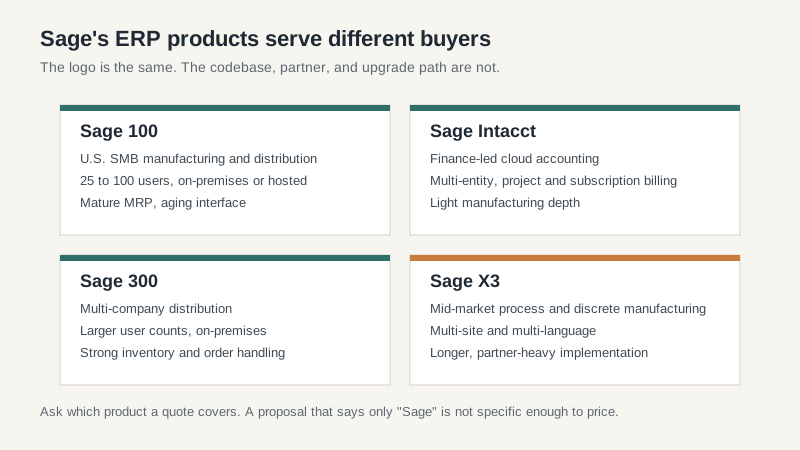
Sage 100 is the U.S. small and mid-market workhorse for manufacturing and distribution. It runs on-premises or hosted, handles inventory, order entry, and light production, and has a mature MRP module. The interface looks like it was designed in 2008 because parts of it were. User counts typically land between 25 and 100.
Sage 300 serves larger, multi-company distributors. Inventory and order handling are strong, and it handles multiple warehouses and currencies better than Sage 100. It’s still largely an on-premises product, and upgrades are projects rather than automatic updates.
Sage Intacct is the cloud finance-led product. Multi-entity consolidation, dimensional reporting, and subscription billing are its strengths. Manufacturing is thin. If your shop floor is the center of the business, Intacct is usually the wrong center of gravity.
Sage X3 is the mid-market manufacturing ERP, built for multi-site process and discrete manufacturers. It’s capable and partner-heavy. Implementations run longer and cost more than the other three, and the partner you choose matters more than the license.
What Sage ERP does well
Distribution is the strongest fit. Sage understands pick, pack, and ship better than most finance-first cloud vendors. Order entry is fast, inventory visibility is decent, and the system handles the messy reality of partial shipments and backorders without requiring a custom module. For a $30 million distributor with 60 users, that’s often enough to justify the purchase.
The installed partner base is another advantage. Sage products have been sold in the U.S. for decades, so you can usually find a partner who has implemented the same product in a similar business. That’s not true of every mid-market vendor, and it shortens the reference-checking phase.
Cost is the third selling point. A Sage 100 project can land well below a NetSuite or Fusion implementation, especially if you already run the infrastructure. For a company that needs better inventory control and financial reporting, not a platform for global expansion, the price-to-fit ratio is hard to beat.
Intacct earns its keep in multi-entity finance. If you run several legal entities, need consolidated reporting, and bill projects or subscriptions, it handles those workflows cleanly. The reporting dimensions are flexible without requiring a data warehouse project.
Where Sage ERP frustrates buyers
The product line is fragmented, and support quality varies by product and partner. A great Sage 100 partner may know nothing about X3. A vendor sales team may promise a cloud roadmap that the product you bought doesn’t share. Ask for the specific product’s release history and the partner’s certifications, not the brand’s broader story.
Upgrades on Sage 100 and 300 are real projects. They require testing, custom code review, and often a consultant. Companies that budget for annual maintenance but not for the upgrade work get surprised every few years. Cloud products shift that burden to the vendor, but Sage’s cloud story is inconsistent across the line.
The interface is dated on the older products. Warehouse staff can learn it, but new hires expect browser-based screens and mobile scanning. If labor turnover is high, the training cost adds up. Sage has improved this on newer releases, and the gap is narrower than it was, but it hasn’t disappeared.
Integrations are another sore spot. Older Sage products rely on partner-built connectors and flat-file imports. Connecting a modern e-commerce platform or a warehouse automation system can take longer than the vendor estimate. Budget for an integration specialist, not only a consultant who knows the general ledger.
Sage ERP pricing and the partner dependency
A Sage 100 license for 40 to 60 users typically runs $15,000 to $50,000, with implementation adding $25,000 to $75,000 depending on customization and data cleanup. Sage 300 lands higher. Intacct is subscription-based, often $15,000 to $60,000 a year for a mid-market scope, plus implementation. X3 is a different league, with first-year costs that can exceed $150,000.
Those ranges are wide because scope is wide. The bigger issue is the partner. Sage sells through a channel, and the channel has consolidated. In some regions you’ll have two credible options; in others, one. That lack of competition shows up in change-order rates and response times.
Ask how many certified consultants the partner has on the specific product, not the whole firm. Ask for their average implementation timeline over the last two years. And ask what happens when your named consultant leaves, because they will.
Who should shortlist Sage ERP
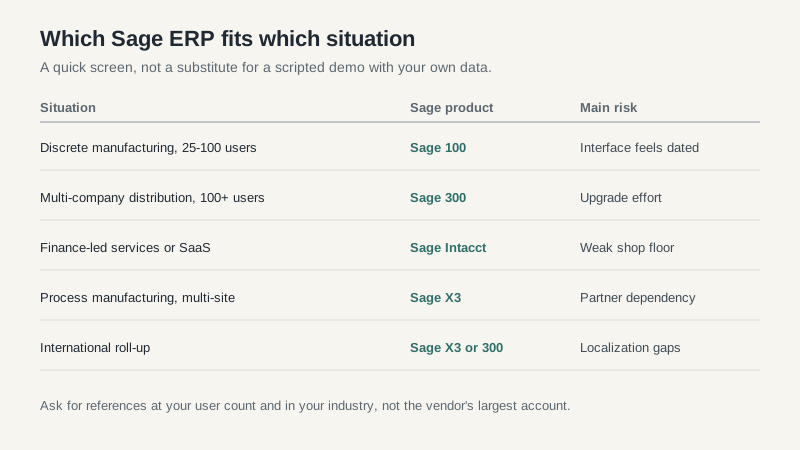
A distributor with 25 to 150 users, a cost ceiling, and a preference for on-premises or hosted deployment should look at Sage 100 or 300. A finance-led company with multiple entities and project billing should look at Intacct. A process manufacturer with several plants should look at X3, then compare it honestly against Epicor and Infor.
Companies with complex discrete manufacturing, global roll-ups, or a need for deep shop-floor control should probably look elsewhere. Sage can be made to fit, but the customization bill erodes the cost advantage that made it attractive.
Before you sign, ask the partner to show you a live upgrade of a customized instance, not a slide. Ask for two references at your user count and in your industry. Then ask both references what they’d do differently. The answers will tell you whether the partner is selling a product or managing a relationship. For the broader selection process, the ERP software buying guide covers the contract and migration traps that apply to every vendor, and the Epicor ERP review is a useful comparison if manufacturing depth is your priority.
