Most ERP software projects don’t fail at go-live. They fail in the conference room three months earlier, when a buying committee picks the system with the best demo instead of the one its staff can actually run. I’ve watched a 180-person distributor sign because the sales rep made inventory look effortless, then spend nine months rebuilding item masters that had been duplicated for a decade.
If you’re shopping now, the useful question isn’t which ERP software has the most features. It’s which one fits the way your order desk, shop floor, and warehouse already hand off work, and which vendor will still answer the phone in year four.
What ERP software actually replaces
In most mid-market companies, the real incumbent is a stack: QuickBooks or a legacy accounting package, a dozen spreadsheets, an Access database someone retired years ago, and two people who know how the month-end close really works. The ERP software’s job is to replace the handoffs between those systems, not to win a feature checklist.
That distinction matters when you scope the project. Spend all your discovery time on general ledger features and you’ll miss the fact that your shipping clerk keys the same order into three places. Spend it on the shop floor and you may never ask how sales commissions are calculated. Broken handoffs are where the money leaks, and they’re the first thing a good implementation partner maps.
Be honest about which processes are actually broken. Software will automate a bad process faster, and then you’ll have a faster bad process with a five-year contract attached.
The ERP software shortlist most mid-market buyers should run
For a manufacturer or distributor between roughly $20 million and $250 million in revenue, the realistic shortlist is narrower than the vendor list suggests. You’re usually choosing between a mid-market suite with a strong partner network, a cloud finance-led product with manufacturing bolt-ons, and a tier-one name sold down-market, such as Oracle’s mid-market options. Each comes with a different failure mode.
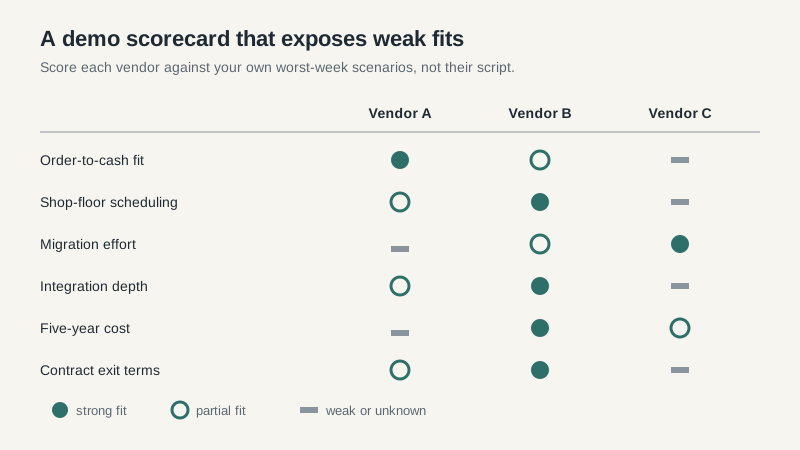
Mid-market suites tend to fit distribution well and manufacturing adequately. Cloud finance products handle multi-entity accounting beautifully and shop-floor scheduling poorly; the cloud ERP cost case deserves its own review before you commit. Tier-one products can do almost anything, which is exactly why the implementation bill grows. I’d rather see a buyer choose the boring system their team can administer than the impressive one that requires a permanent consultant.
Run scripted demos. Give each vendor the same three scenarios drawn from your worst week: a rush order with a partial shipment, a credit hold that has to clear before release, and a month-end close with an inventory adjustment. Watch how many clicks it takes and whether the sales engineer hesitates. Hesitation is data.
Where the budget goes off the rails
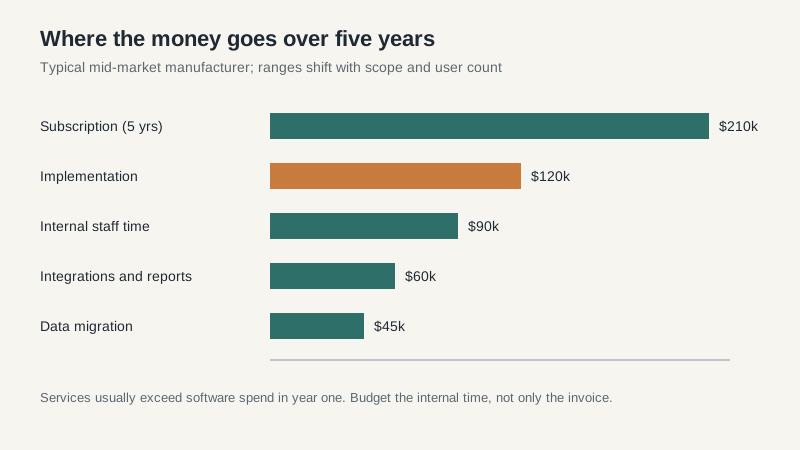
The license or subscription is rarely the line that breaks the budget. Implementation services usually run somewhere between one and two times the annual software cost for a mid-market manufacturer, and that range hides a lot. Data cleanup, integrations, and custom reporting are where the estimate quietly doubles.
Ask for a written list of what’s included in the fixed-fee scope. Then ask what happens when a workshop runs long or a legacy report has no equivalent. Most contracts treat those as change orders, billed at $150 to $250 an hour. A project that starts at $180,000 can land at $280,000 without anyone behaving badly.
Budget internal time, too. Your controller, IT lead, and warehouse supervisor will lose 30% to 50% of their capacity during design and testing. Companies that don’t backfill that time end up with a stalled project and a team that resents it.
Data migration is the part nobody demos
Every ERP software demo starts with a clean database. Yours isn’t clean. Item masters have duplicates, customers have six ship-to addresses and two spellings, and the bill of materials for your best-selling product hasn’t been audited since 2019.
The last migration I sat through lost two weeks because nobody cleaned the item master before cutover. The team loaded 14,000 SKUs, found 2,300 duplicates, and then had to stop production planning until the mess was resolved. The software was fine. The data was not.
Start cleanup six months before go-live, not six weeks. Assign one owner per data domain, define what “good enough” means, and accept that some history should be archived rather than migrated. Nobody needs twelve years of closed work orders in the new system.
The partner matters more than the logo
The same product can be a success with one implementation partner and a cautionary tale with another. Ask who will actually be on your project, how many projects that person is running at the same time, and whether the partner has done a comparable migration in the last year. A senior sales engineer at the demo is not the same thing as a senior consultant at kickoff.
Check references with a specific question: what did the project cost at signing, and what did it cost at the end? Buyers who answer that honestly are worth ten who say everything went smoothly. Also ask how the partner handled the first big change request, because that moment sets the tone for the rest of the project.
A timeline that won’t surprise you
A single-site mid-market implementation usually takes six to twelve months from contract to go-live. Discovery and design eat the first two to three months. Configuration and data work take another three to five. Testing always takes longer than the plan, and cutover is a long weekend that turns into two weeks of fixing things nobody tested.
Don’t compress testing to protect a launch date. A delayed go-live costs less than a month of wrong inventory balances. If the vendor pushes a fixed date before discovery is finished, treat that as a warning about how the rest of the project will run.
Contract terms that decide whether you can leave
Read the exit clause before you read the feature list. Ask what happens to your data if you leave, how much the vendor charges to export it, and whether your customizations survive an upgrade. I’ve seen companies stay on a system they disliked because the cost of extracting their own records was quoted in the high five figures.
Pin down the upgrade cadence as well. Cloud vendors push releases two or three times a year. If your customizations break every time, you’ll spend your maintenance budget on rework instead of improvement. Ask for a sandbox and a named person accountable for regression testing.
Before you take another demo, pull your last twelve months of order exceptions and inventory adjustments. Hand that list to every vendor and ask how their system would handle the top ten. The answers will tell you more than any slide deck, and they’ll expose the vendor that only knows how to show the happy path.
